Hero Headers
Hier steht die Subline
Hero Header 10
Lorem ipsum dolor sit amet, consetetur sadipscing elitr, sed diam nonumy eirmod tempor invidunt ut labore et dolore magna aliquyam erat, sed diam voluptua. At vero eos et accusam et

Hero Header 20
Hier steht der Untertitel, your content goes here.Hier steht der Bodytext. Your content goes here. Edit or remove this text inline or in the module Content settings.
Hier steht die Subline
Hero Header 30
Lorem ipsum dolor sit amet, consetetur sadipscing elitr, sed diam nonumy eirmod tempor invidunt ut labore et dolore magna aliquyam erat, sed diam voluptua.
Hero Header 40 mit Bild oben
Your content goes here. Edit or remove this text inline or in the module Content settings. You can also style every aspect of this content in the module Design settings and even apply custom CSS to this text in the module Advanced settings.
Feature
Hier steht die Subline
Feature 10
Lorem ipsum dolor sit amet, consetetur sadipscing elitr, sed diam nonumy eirmod tempor invidunt ut labore et dolore magna aliquyam erat, sed diam voluptua. At vero eos et accusam etAt vero eos et accusam etAt vero eos et accusam etAt vero eos et accusa.

Hier steht die Subline
Feature 20
Your content goes here. Edit or remove this text inline or in the module Content settings. You can also style every aspect of this content in the module Design settings and even apply custom CSS to this text in the module Advanced settings.
Your content goes here.
Edit or remove this text inline or in the module Content settings.
Your content goes here.
Edit or remove this text inline or in the module Content settings.
Hier steht die Subline
Feature 23
Feature 23
Your content goes here. Edit or remove this text inline.
Feature 23
Your content goes here. Edit or remove this text inline.
Feature 23
Your content goes here. Edit or remove this text inline.
Feature 23
Your content goes here. Edit or remove this text inline.
Hier steht die Subline
Feature 26
Headline goes here
Your content goes here. Edit or remove this text inline.
Headline goes here
Your content goes here. Edit or remove this text inline.
Headline goes here
Your content goes here. Edit or remove this text inline.
Hier steht die Subline
Feature 30
Lorem ipsum dolor sit amet, consetetur sadipscing elitr, sed diam nonumy eirmod tempor invidunt ut labore et dolore magna aliquyam erat, sed diam voluptua.
Hier steht die Subline
Feature 40 - 1
Lorem ipsum dolor sit amet, consetetur sadipscing elitr, sed diam nonumy eirmod tempor invidunt ut labore et dolore magna aliquyam erat, sed diam voluptua.
Hier steht die Subline
Feature 40 - 2
Lorem ipsum dolor sit amet, consetetur sadipscing elitr, sed diam nonumy eirmod tempor invidunt ut labore et dolore magna aliquyam erat, sed diam voluptua.
Hier steht die Subline
Feature 50
Lorem ipsum dolor sit amet, consetetur sadipscing elitr, sed diam nonumy eirmod tempor invidunt ut labore et dolore magna aliquyam erat, sed diam voluptua. At vero eos et accusam etAt vero eos et accusam etAt vero eos et accusam etAt vero eos et accusa.
Hier steht die Subline
Feature 53 mit einer langen Headline
Lorem ipsum dolor sit amet, consetetur sadipscing elitr, sed diam nonumy eirmod tempor invidunt ut labore et dolore magna aliquyam erat, sed diam voluptua. At vero eos et accusam etAt vero eos et accusam etAt vero eos et accusam etAt vero eos et accusa.
Hier steht die Subline
Feature 55 beinhaltet eine lange Headline
Your content goes here. Edit or remove this text inline or in the module Content settings. You can also style every aspect of this content in the module Design settings
Your content goes here.
Edit or remove this text inline or in the module Content settings.
Your content goes here.
Edit or remove this text inline or in the module Content settings.
Hier steht die Subline
Feature 60 mit einem Bild unten
Your content goes here. Edit or remove this text inline or in the module Content settings. You can also style every aspect of this content in the module Design settings and even apply custom CSS to this text in the module Advanced settings.
Your content goes here.
Edit or remove this text inline or in the module Content settings.
Your content goes here.
Edit or remove this text inline or in the module Content settings.
Hier steht die Subline
Feature 70
Your content goes here. Edit or remove this text inline or in the module Content settings. You can also style every aspect of this content in the module Design settings and even apply custom CSS to this text in the module Advanced settings.
Your content goes here. Edit or remove this text inline or in the module Content settings. You can also style every aspect of this content in the module Design settings and even apply custom CSS to this text in the module Advanced settings.
Feature Lists / Cards / Kacheln
Your content goes here.
Feature List 238
Lorem ipsum dolor sit amet, consetetur sadipscing elitr, sed diam nonumy eirmod tempor invidunt ut labore et dolore magna aliquyam erat, sed diam voluptua. At vero eos et accusam et
Headline
Bodycopy lorem ipsum dolor sit amet, consetetur sadipscing elitr, sed diam nonumy eirmod.
Headline
Bodycopy lorem ipsum dolor sit amet, consetetur sadipscing elitr, sed diam nonumy eirmod.
Headline
Bodycopy lorem ipsum dolor sit amet, consetetur sadipscing elitr, sed diam nonumy eirmod.
Feature List 239
Lorem ipsum dolor sit amet, consetetur sadipscing elitr, sed diam nonumy eirmod tempor invidunt ut labore et dolore magna aliquyam erat, sed diam voluptua. At vero eos et accusam et
Headline
Bodycopy lorem ipsum dolor sit amet, consetetur sadipscing elitr, sed diam nonumy eirmod.
Headline
Bodycopy lorem ipsum dolor sit amet, consetetur sadipscing elitr, sed diam nonumy eirmod.
Headline
Bodycopy lorem ipsum dolor sit amet, consetetur sadipscing elitr, sed diam nonumy eirmod.
Feature List 1
Your content goes here. Edit or remove this text inline or in the module Content settings. You can also style every aspect of this content in the module Design settings and even apply custom CSS to this text in the module Advanced settings.
Headline
Subtitle Lorem ipsum dolor sit amet, consetetur sadipscing elitr, sed diam nonumy eirmod tempor invidunt ut labore et dolore
Headline
Subtitle Lorem ipsum dolor sit amet, consetetur sadipscing elitr, sed diam nonumy eirmod tempor invidunt ut labore et dolore
Headline
Subtitle Lorem ipsum dolor sit amet, consetetur sadipscing elitr, sed diam nonumy eirmod tempor invidunt ut labore et dolore
Feature List 2
Your content goes here. Edit or remove this text inline or in the module Content settings. You can also style every aspect of this content in the module Design settings and even apply custom CSS to this text in the module Advanced settings.
Headline
Your content goes here. Edit or remove this text inline
Headline
Your content goes here. Edit or remove this text inline
Headline
Your content goes here. Edit or remove this text inline
Feature List 3
Your content goes here. Edit or remove this text inline or in the module Content settings. You can also style every aspect of this content in the module Design settings and even apply custom CSS to this text in the module Advanced settings.
Headline
Listenpunkt
Content goes here
Listenpunkt
Content goes here
Listenpunkt
Content goes here
Headline
Listenpunkt
Content goes here
Listenpunkt
Content goes here
Listenpunkt
Content goes here
Headline
Listenpunkt
Content goes here
Listenpunkt
Content goes here
Listenpunkt
Content goes here
Feature List 4
Your content goes here. Edit or remove this text inline or in the module Content settings. You can also style every aspect of this content in the module Design settings and even apply custom CSS to this text in the module Advanced settings.
Headline
Your content goes here. Edit or remove this text inline
Headline
Your content goes here. Edit or remove this text inline
Headline
Your content goes here. Edit or remove this text inline
subline
feature list 396
Ob umfassende Sanierungen oder die regelmäßige Wartung Ihrer Anlagen – Conrad Haustechnik ist Ihr verlässlicher Partner für alle Arbeiten rund um Ihre Immobilie. Unser Team bietet Ihnen maßgeschneiderte Lösungen, schnelle Hilfe und höchste Qualitätsstandards bei allen Projekten.
Sanierungsservice
Ob Bad oder Heizung – wir bringen Ihre Räume auf den neuesten Stand.
Fachgerechte Installation
Von Profis installiert für langanhaltende Funktion und Effizienz.
Regelmäßige Wartung
Für den reibungslosen Betrieb und längere Lebensdauer Ihrer Anlagen.
Über uns / About
About 22 - Über uns
Your content goes here. Edit or remove this text inline or in the module Content settings. You can also style every aspect of this content in the module Design settings and even apply custom CSS to this text in the module Advanced settings.
About 1 - Über uns Headline
Your content goes here.
Edit or remove this text inline or in the module Content settings. You can also style every aspect of this content in the module Design settings and even apply custom CSS to this text in the module Advanced settings.
Your content goes here.
Edit or remove this text inline or in the module Content settings. You can also style every aspect of this content in the module Design settings and even apply custom CSS to this text in the module Advanced settings.
Kontaktieren Sie uns
Your content goes here. Edit or remove this text inline or in the module Content settings.
Contact / Kontakt
Contact 10
Kontakt
Öffnungszeiten
Kontakt
Öffnungszeiten
Termin
Anfahrtskarte (Google Maps)
Contact 20
Wir freuen und auf Ihre Nachricht und Anfargen.
Kontakt
Öffnungszeiten
Gallery
Testimonials
Rezensionen
Das sagen unsere Kunden

"Ich musste mich um nichts kümmern"
Lorem ipsum dolor sit amet, consetetur sadipscing elitr, sed diam nonumy eirmod tempor invidunt ut labore et dolore magna aliquyam erat, sed diam voluptua. At vero eos et accusam et justo duo dolores et ea rebum. Stet clita kasd gubergren, no sea takimata sanctus est Lorem ipsum dolor sit amet.
Max M.
"Ich musste mich um nichts kümmern"
Lorem ipsum dolor sit amet, consetetur sadipscing elitr, sed diam nonumy eirmod tempor invidunt ut labore et dolore magna aliquyam erat, sed diam voluptua. At vero eos et accusam et justo duo dolores et ea rebum. Stet clita kasd gubergren, no sea takimata sanctus est Lorem ipsum dolor sit amet.
Max M.
FAQ
FAQ 1
Frage
Antwort
Frage
Antwort
Frage
Antwort
Frage
Antwort
Frage
Antwort
Call to Action / Above Footer
Kontaktieren Sie uns
Wir freuen uns auf Ihren Anruf oder auf Ihre E-Mail.
Kontaktieren Sie uns für Hilfe
Wir stehen Ihnen jederzeit für eine unverbindliche Beratung oder Terminvereinbarung zur Verfügung.
Styleguide
Wie das ganze mit Farben aussieht
Hero Color Accent Section
Lorem ipsum dolor sit amet, consetetur sadipscing elitr, sed diam nonumy eirmod tempor invidunt ut labore et dolore magna aliquyam erat, sed diam voluptua. At vero eos et accusam et
primary color
Backgound secondary color.
Icon Color über "Global" definieren. So kann mit einem Klick eine andere Farbe (Primary oder Secondary) definiert werden. Diese erscheint in jedem Modul, in dem die Farben global definiert wurden.
Complementär
Icon Color über "Global" definieren. So kann mit einem Klick eine andere Farbe (Primary oder Secondary) definiert werden. Diese erscheint in jedem Modul, in dem die Farben global definiert wurden.
Complementär
Icon Color über "Global" definieren. So kann mit einem Klick eine andere Farbe (Primary oder Secondary) definiert werden. Diese erscheint in jedem Modul, in dem die Farben global definiert wurden.
Headline 1 - Überschrift der ersten Ordnung
Headline 2 - Überschrift der ersten Ordnung
Headline 3 - Überschrift der ersten Ordnung
Headline 4 - Überschrift der ersten Ordnung
Bold your content goes here. Edit or remove this text inline or in the module Content settings.
Italic your content goes here. Edit or remove this text inline or in the module Content settings.
Body copy your content goes here. Edit or remove this text inline or in the module Content settings. You can also style every aspect of this content in the module Design settings and even apply custom CSS to this text in the module Advanced settings. Body copy your content goes here. Edit or remove this text inline or in the module Content settings. You can also style every aspect of this content in the module Design settings and even apply custom CSS to this text in the module Advanced settings.
1234567890
ÄÜÖß !"§$%&/()=?#+-*
- Lorem ipsum dolor sit amet
- consetetur sadipscing elitr
- sed diam nonumy eirmod tempor invidunt
- ut labore et dolore magna aliquyam erat
- Lorem ipsum dolor sit amet
- consetetur sadipscing elitr
- sed diam nonumy eirmod tempor invidunt
- ut labore et dolore magna aliquyam erat
Spielwiese mit Fließtext und Farben - Headline 1
Wie sieht das ganze aus mit Typografie- und Farbeinstellungen? Folgend Beispielinhalt, um Farben- und Schrifteinstellungen besser beurteilen zu können.
Your content goes here. Edit or remove this text inline or in the module Content settings. You can also style every aspect of this content in the module Design settings and even apply custom CSS to this text in the module Advanced
Headline 2 mit einer längeren Überschrift
You can also style every aspect of this content in the module Design settings and even apply custom CSS to this text in the module Advanced settings.Your content goes here. Edit or remove this text inline or in the module Content settings. You can also style every aspec.
Headline 3 mit kurzer Überschrift
You can also style every aspect of this content in the module Design settings and even apply custom CSS to this text in the module Advanced settings.Your content goes here. Edit or remove this text inline.
Headline 4 mit kurzer Überschrift
You can also style every aspect of this content in the module Design settings and even apply custom CSS to this text in the module Advanced settings.Your content goes here. Edit or remove this text inline.
Uppercase Headline 1
Your content goes here. Edit or remove this text inline or in the module Content settings. You can also style every aspect of this content in the module Design settings and even apply custom CSS to this text in the module Advanced settings.
Uppercase Headline 2
You can also style every aspect of this content in the module Design settings and even apply custom CSS to this text in the module Advanced settings.Your content goes here. Edit or remove this text inline or in the module Content settings.
Uppercase Headline 3
You can also style every aspect of this content in the module Design settings and even apply custom CSS to this text in the module Advanced settings.Your content goes here. Edit or remove this text inline or in the module Content settings.
Uppercase Headline 4
You can also style every aspect of this content in the module Design settings and even apply custom CSS to this text in the module Advanced settings.Your content goes here. Edit or remove this text inline or in the module Content settings.
Icon mit Primary Color
Icon Color über "Global" definieren. So kann mit einem Klick eine andere Farbe (Primary oder Secondary) definiert werden. Diese erscheint in jedem Modul, in dem die Farben global definiert wurden.
Icon mit Primary Color
Icon Color über "Global" definieren. So kann mit einem Klick eine andere Farbe (Primary oder Secondary) definiert werden. Diese erscheint in jedem Modul, in dem die Farben global definiert wurden.
Icon mit Primary Color
Icon Color über "Global" definieren. So kann mit einem Klick eine andere Farbe (Primary oder Secondary) definiert werden. Diese erscheint in jedem Modul, in dem die Farben global definiert wurden.
Complementär
Icon Color über "Global" definieren. So kann mit einem Klick eine andere Farbe (Primary oder Secondary) definiert werden. Diese erscheint in jedem Modul, in dem die Farben global definiert wurden.
Complementär
Icon Color über "Global" definieren. So kann mit einem Klick eine andere Farbe (Primary oder Secondary) definiert werden. Diese erscheint in jedem Modul, in dem die Farben global definiert wurden.
Complementär
Icon Color über "Global" definieren. So kann mit einem Klick eine andere Farbe (Primary oder Secondary) definiert werden. Diese erscheint in jedem Modul, in dem die Farben global definiert wurden.
Primary Color (Background)
Edit or remove this text inline or in the module Content settings. You can also style every aspect of this content in the module Design settings and even apply custom CSS to this text in the module Advanced settings. Your content goes here. Edit or remove this text inline or in the module Content settings. You can also style every aspect of this content in the module Design settings and even apply custom CSS to this text in the module Advanced settings.
Secondary Color (Background)
Edit or remove this text inline or in the module Content settings. You can also style every aspect of this content in the module Design settings and even apply custom CSS to this text in the module Advanced settings. Your content goes here. Edit or remove this text inline or in the module Content settings. You can also style every aspect of this content in the module Design settings and even apply custom CSS to this text in the module Advanced settings.
Accentfarben mit globalen Farben
Globale Farben im Customizer definieren: General Settings ▸Layout Settings:
Primary Color, Secondary Color
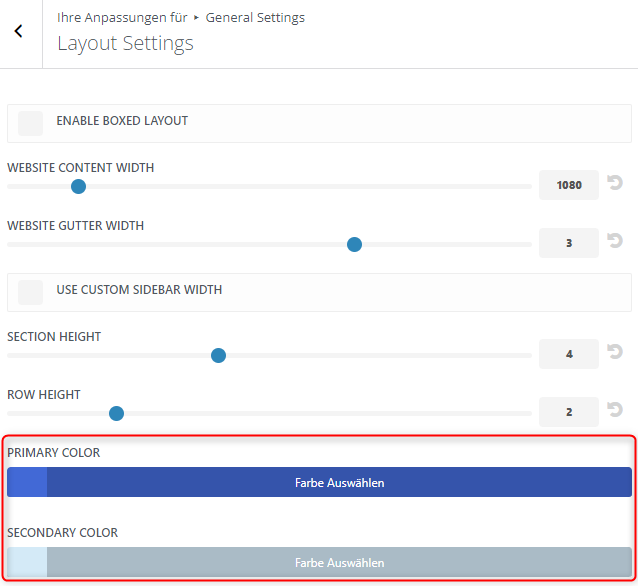
In den Modulen die "Global"-Farbpalette auswählen und dort die Farben wählen.

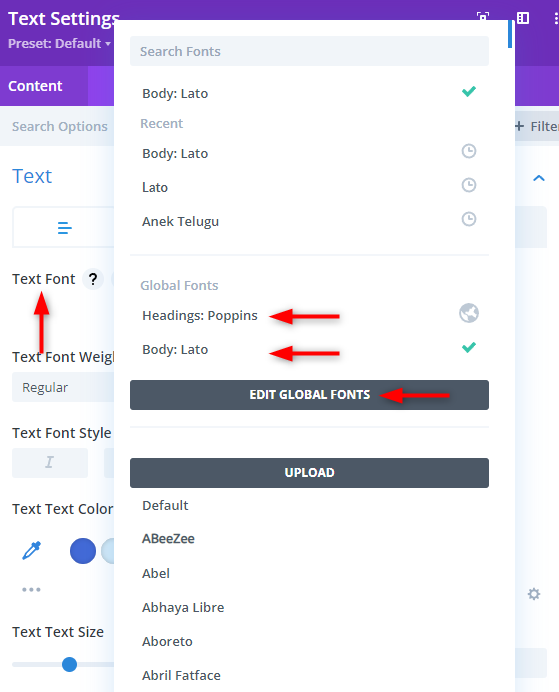
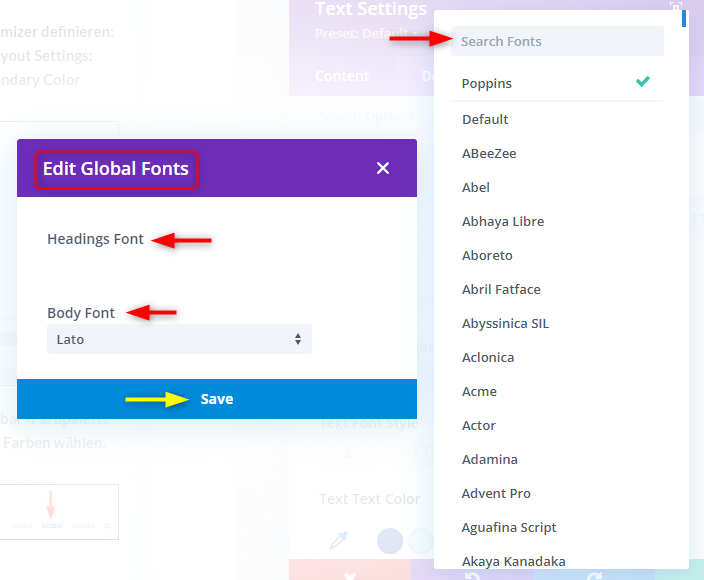
Font Family über Modul suchen